A Very Practical Application of SeaDragon Deep Zoom
You have a stunning gigapixel image — a Hubble photograph, a museum painting scanned at extraordinary resolution, an aerial survey of a city. You want to put it on a website so visitors can zoom in and explore every detail. The technology to do this exists and it's called SeaDragon deep zoom.
The obstacle is never the technology. It's the website. Institutional and corporate sites — NASA, National Geographic, a university, a museum — are complex organisms. Getting anything new onto them means navigating CMS approvals, development sprints, accessibility reviews, security audits, and budgets. A feature that takes an afternoon to build can take a year to deploy.
What if you didn't have to change the website at all?
SeaDragon can be injected into any existing page with nothing more than an ordinary HTML link — the kind that already exists on millions of pages. No CMS changes. No new deployments. No IT tickets. Just a link.
Example 1 — Wrapping a static image
The same pattern works for images. Before: a static JPEG sitting on the page. After: clicking it opens the full gigapixel deep-zoom version. The thumbnail stays exactly as it was.
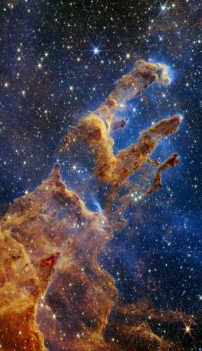
<!-- Before -->
<img src="pillars.jpg" alt="Pillars of Creation">

<!-- After — add one onclick attribute -->
<img src="pillars.jpg"
     alt="Pillars of Creation"
     style="cursor:pointer"
     onclick="(function(e){
       var s = document.createElement('script');
       s.src = 'https://bbas-test.me/processSharp/seaDragonInject.js';
       s.setAttribute('data-dzi',   'https://bbasrec.us/dzi/pillars-of-creation/pillars-of-creation.dzi');
       s.setAttribute('data-title', 'Pillars of Creation');
       s.setAttribute('data-x', e.clientX);
       s.setAttribute('data-y', e.clientY);
       document.body.appendChild(s);
     })(event)">
The injector script loads OpenSeadragon from a CDN on first use and reuses it for subsequent viewers. Nothing is installed on the host page. Nothing changes on the server. The deep-zoom tiles live on your own infrastructure — in this case Amazon S3 — and the viewer pops up wherever the user clicked.
Example 2 — Retrofitting a text link
Imagine an existing article on an astronomy website. It already mentions the Carina Nebula. Before: a plain text link going nowhere interesting. After: the same link opens a full deep-zoom viewer.
<!-- Before -->
<a href="#">Carina Nebula</a>

<!-- After -->
<a href="javascript:void(0)"
   onclick="(function(e){
     var s = document.createElement('script');
     s.src = 'https://bbas-test.me/processSharp/seaDragonInject.js';
     s.setAttribute('data-dzi',   'https://bbasrec.us/dzi/carina-nebula/carina-nebula.dzi');
     s.setAttribute('data-title', 'Carina Nebula');
     s.setAttribute('data-x', e.clientX);
     s.setAttribute('data-y', e.clientY);
     document.body.appendChild(s);
   })(event)">
  Carina Nebula
</a>